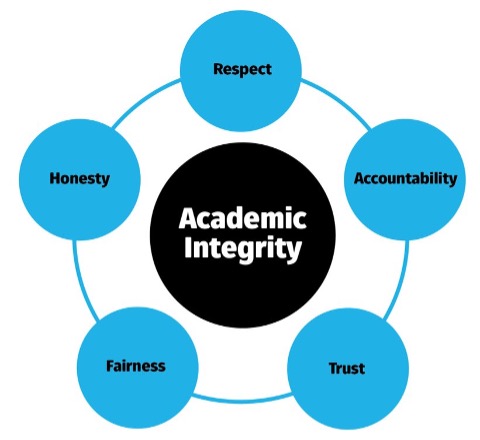
To ensure you have complied with our principles of conduct around the use of genAI and more generally for academic integrity, your course coordinator may wish to discuss the construction of assessment items with you from time to time. Please make sure that you retain drafts/versions of your progress prior to submission.
To learn more about academic integrity, please access the following resources:
To see how to acknowledge your use of genAI tools in your assessments, check out the Cite page.
The University provides free access for staff and students to the premium version of Copilot; sign in using your University Microsoft account details.
Copilot can also be accessed via the icon in the Edge browser, top right, along from the URL bar.

Copilot draws from GPT-4 and is connected to the Internet so its responses have more chance of using up-to-date sources. Copilot also provides links to where it obtained information, which can aid in checking for authority and accuracy (this is important to do!). Image generation is also possible via Copilot's integration Designer (powered by DALL-E).
The University's access to Copilot provides enterprise protection for your data and does not use your prompts to train the language model or system. Your prompts and Copilot's responses are now saved for 90 days, under enterprise data protection.
It's important to check for the shield icon top-right of window to ensure that you're logged in through the University's access. If you hover your mouse over the shield it should read: "Enterprise data protection applies to this chat", as shown right.

Update 21 August 2025: Microsoft has added opt-in access to GPT-5. To enable GPT-5, users currently need to click the button shown right. The button will then display as 'GPT-5 On'.

Our Writing Prompts page has information from Microsoft on how to get the best out of Copilot.
To learn more about Copilot:
The University does not endorse any of the following tools. For an approved AI tool, see the enterprise version of Copilot above.
Generative AI is an evolving space. Keep up to date with new tools via There's an AI for That and the Generative AI Product Tracker.
Here is a very short list of some generative AI tools. These may not offer data security/privacy like the University's access to Copilot:
If you course or assessment allows for the use of genAI, first check out our Writing Prompts page.
Still not getting what you need? Here are some tips to get better results:
GenAI tools can’t replicate your learning or style of writing because they are yours, but it can provide you with some ideas. You can expand on those ideas by researching, exploring other resources (try using Library Search to find some!) and extrapolating from lectures and tutorials.
Does it agree with what you’ve already learned about your subject? How does it compare with other subject-specific resources you have read - is it accurate? Does it contain any kind of bias, or unexpected results? For more help with evaluating content, try the Library’s Resource Evaluation Tool.
If not, try adding more parameters to your prompt. For example:
For more see our page on Writing prompts.
You can ask for responses in the form of bulleted lists, dot points, tables, and so on, instead of straight text. If you’re feeling adventurous you can even ask for the response to be formatted in HTML or CSS.
For more see our page on Writing prompts.
The Masterpreneur's guide for beginners provides some useful tips, as does the CREATE framework by Tom Barrett. The CREATE framework is also applied in this LinkedIn Learning course (1hr 15 mins): How to Research and Write Using Generative AI Tools
Note: If your assessment states you need scholarly, authoritative resources, you may like to use Library Search or a library database, and restrict your results to articles from peer-reviewed journals.
Before creating AI-generated imagery there are a number of considerations to be taken into account. LDTI here at the University have created some useful pages for use of AI image generators:
These pages have been created with staff/course use in mind, but still have useful information for students.
And when working with image generators, don't forget about the potential bias and copyright issues and considerations in this space, and acknowledging that you've use an AI tool (see the Cite page).
The University of Sydney had an expansive list of creation tools and models on their AI in Education site, including for audio and video, presentations, coding, and 3D models.
HDR students may have additional considerations from working in research spaces. HDR students and their supervisors should read the guidance for Generative Artificial Intelligence and Higher Degrees by Research (PDF). See also our page on AI for Research.
We'd love to hear your feedback on this portal. If you think changes could be made, or more information added, please visit our feedback page.